CrImage::Operation::Draw
Draws shapes in the image
Taking sample image:

image.draw_square(40, 30, 80, 80, CrImage::Color.of("#00f"))
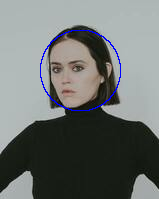
image.draw_circle(80, 70, 40, CrImage::Color.of("#00f"))
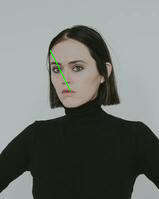
image.draw_line(50, 50, 70, 90, CrImage::Color.of("#0f0"))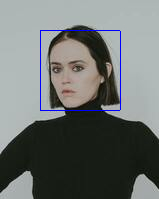
Can also use the fill: true parameter to fill in the drawn shapes
Instance methods
draw_circle(x : Int, y : Int, radius : Int, color : Color, *, fill : Bool = false) : self
Draw a circle centered at x, y with radius
draw_circle(region : Region, radius : Int, color : Color, *, fill : Bool = false) : self
Draw a circle around the region's center (see Region#center)
draw_circle!(center_x : Int, center_y : Int, radius : Int, color : Color, *, fill : Bool = false) : self
Sourcedraw_circle!(region : Region, color : Color, *, fill : Bool = false, radius : Int32 | Nil = nil) : self
Draw a circle around the region's center (see Region#center)
draw_line(x1 : Int32, y1 : Int32, x2 : Int32, y2 : Int32, color : Color) : self
Sourcedraw_line!(x1 : Int32, y1 : Int32, x2 : Int32, y2 : Int32, color : Color) : self
Implementation of http://www.edepot.com/linec.html
draw_square(x : Int, y : Int, box_width : Int, box_height : Int, color : Color, *, fill : Bool = false) : self
Sourcedraw_square(region : Region, color : Color, *, fill : Bool = false) : self
Sourcedraw_square!(x : Int, y : Int, box_width : Int, box_height : Int, color : Color, *, fill : Bool = false) : self
Sourcedraw_square!(region : Region, color : Color, *, fill : Bool = false) : self
Source