CrImage::GrayscaleImage
Inherits CrImage::Format::WebP < CrImage::Format::JPEG < CrImage::Operation::MaskApply < CrImage::Format::Save < CrImage::Operation::VerticalBlur < CrImage::Operation::Pad < CrImage::Operation::Rotate < CrImage::Operation::HorizontalBlur < CrImage::Operation::HistogramEqualize < CrImage::Operation::GaussianBlur < CrImage::Operation::Draw < CrImage::Operation::Crop < CrImage::Operation::Contrast < CrImage::Operation::ChannelSwap < CrImage::Operation::Brightness < CrImage::Operation::BoxBlur < CrImage::Operation::BilinearResize < CrImage::Format::PNG < CrImage::Format::PPM < CrImage::Image < Reference < Object
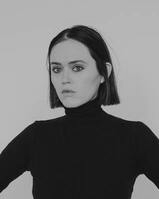
An image in Grayscale. These image types are the easiest to perform feature and information extraction from, where
there is only one channel to examine, and so has methods for constructing Masks from (see #threshold below).
An RGBAImage would become a GrayscaleImage this way:
image.to_gray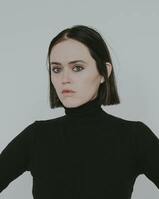
Constructors
Read image_data as JPEG encoded bytes
Construct an Image from reading in bytes from io
Read image_data and PNG encoded bytes
Construct an Image by reading bytes from io
Read image_data as PPM encoded bytes
Read bytes from io as PPM encoded
Read image_data as WebP encoded bytes
Read bytes from io as WebP encoded
Create a GrayscaleImage from a set of color channels (delegates to RGBAImage#to_gray)
Create a GrayscaleImage with only an Array(UInt8) (alpha channel initialized as 255 throughout)
Create a GrayscaleImage with only an Array(UInt8) (alpha channel initialized as 255 throughout)
Instance methods
Return the Array(UInt8) corresponding to channel_type
Set the underlying Array(UInt8) of channel_type to the new channel.
Warning: this method does not check the size of the incoming array, and if it's a different
size from what the current image represents, this could break it. We recommend against using
this method except for from other methods that will be updating the width and height immediately after.
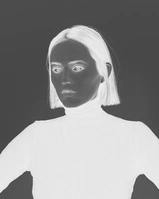
Invert grayscale pixels (replace each pixel will 255 - p for all p in @gray). Modifies self.
Becomes
Construct a simple threshold Mask containing all pixels with a UInt8 value greater than threshold
Given sample image:
image
  .to_gray                       # convert color image to grayscale one
  .threshold(128)                # generate a mask using threshold operator
  .to_gray                       # convert mask to grayscale image
  .save("threshold_example.jpg") # save mask as grayscale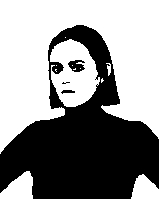
Receive a copy of the underlying Array(UInt8) corresponding to the ChannelType::Gray channel
Convert this image into a UInt8Map. Does not clone underlying gray channel, both this image and map share the same data.
Convert this grayscale image to an RGBA one using the provided color map.
The provided map should have a key for all 0-255 possible gray pixel values, otherwise the default
Color will be used instead (default is black).
colors = 256.times.to_a.map { |i| {i.to_u8, CrImage::Color.random} }.to_h
gray_image.to_rgba(colors).save("to_rgba_color_map_sample.jpg")
Becomes
Convert this GrayscaleImage to an RGBAImage.
No color will be provided, all pixels will remain gray.