module

CrImage::MapImpl(T)

Inherits CrImage::NumericMap < CrImage::Map

A collection of implementations of NumericMap(T), intended to be included in base classes.

See IntMap, FloatMap, and ComplexMap.

Constructors

new(width : Int32, height : Int32, initial : T)
Source
new(width : Int32, raw : Array(T))
Source
new(other : Array(Array(T)))
Source
new(width : Int32, height : Int32, &)
Source

Instance methods

*(num : Int | Float) : self

Multiply each point in this Map by num

Source
+(num : Int | Float) : self

Add each point in this Map by num

Source
+(other : self) : self

Add each point of this Map with each point in other

Source
-(other : NumericMap(T)) : self
Source
-(num : Int) : self

Subtract each point in this Map by num

Source
-(num : Float) : FloatMap

Subtract each point in this Map by num

Source
/(num : Int | Float) : FloatMap

Divides each point in this Map by num

TODO: ComplexMap shouldn't return a FloatMap

Source
<(num : Int | Float) : Mask

Construct a Mask identifying all pixels smaller than num.
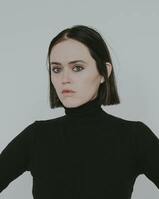
Woman with black turtleneck and white background
gray = image.to_gray                          # Convert color image to grayscale
mask = gray < 128                             # Generate a threshold mask
mask.to_gray.save("greater_than_example.jpg") # Convert and save the mask as a black and white image
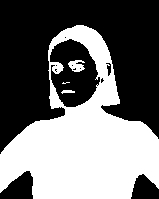
Black and white silhouette with background and woman's face as white, hair and sweater black
Source
<=(num : Int | Float) : Mask

Construct a Mask identifying all pixels smaller than or equal to num. See #< for example.

Source
==(num : Int | Float) : Mask

Construct a Mask identifying all pixels equal to num

Source
==(other : self) : Bool

Check if this Map is equal to other

Source
>(num : Int | Float) : Mask

Construct a Mask identifying all pixels larger than num.

Woman with black turtleneck and white background
gray = image.to_gray                          # Convert color image to grayscale
mask = gray > 128                             # Generate a threshold mask
mask.to_gray.save("greater_than_example.jpg") # Convert and save the mask as a black and white image
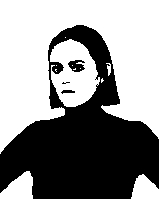
Black and white silhouette with background and woman's face as white, hair and sweater black
Source
>=(num : Int | Float) : Mask

Construct a Mask identify all pixels larger than or equal to num. See #> for near example.

Source
[](xstart : Int32, xcount : Int32, ystart : Int32, ycount : Int32) : self

Crop the map to the values contained from xstart out by xcount, and ystart out by ycount

Source
[](x : Int32, y : Int32) : T

Get element at coordinates x and y

Source
[](xrange : Range, ystart : Int32) : self

Crop the map, returning only the values in row at ystart

Source
[](xstart : Int32, yrange : Range) : self

Crop the map, returning only the values in column at xstart

Source
[](xrange : Range, yrange : Range) : self

Crop the map to the values contained in xrange and yrange

Source
[](index : Int32) : T

Get element at index from underlying raw Array.

Source
[]?(x : Int32, y : Int32) : T | Nil

Get lement at coordinates x and y, or nil if coordinates are out of bounds

Source
[]?(index : Int32) : T | Nil

Get element at index, or nil if out of bounds

Source
column(x : Int32) : self

Get a single dimensional Map representing teh column at x

Source
cross_correlate(template : Map, *, edge_policy : EdgePolicy = EdgePolicy::Repeat) : FloatMap

Perform a brute force cross correlation calculation with provided template.

Source
cross_correlate_fft(template : Map, *, edge_policy : EdgePolicy = EdgePolicy::Black) : FloatMap

Perform a Fast Fourier Transform cross correlation (convolution?) with provided template. See FftUtil

Source
fft

Performe a Fast Fourier Transform, padding out this Map so dimensions are a power of 2. See FftUtil

Source
height
Source
mask_from

Construct a Mask from this GrayscaleImage using the passed in block to determine if a given pixel should be true or not

# Construct a mask identifying the bright pixels in the bottom left corner of image
image.to_gray.mask_from do |pixel, x, y|
  x < image.width // 2 &&      # left half of image
    y > (image.height // 2) && # bottom half of image
    pixel > 128                # only "bright" pixels
end
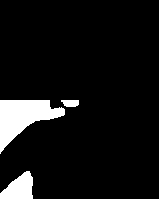
Woman in black turtleneck on white background -> Mask identifying bright spots in lower left corner
Source
max

Return the maximum value in this Map

Source
mean

Return the average of the elements in this Map

Source
min

Return the minimum value in this Map

Source
pad(all : Int32 = 0, *, top : Int32 = 0, bottom : Int32 = 0, left : Int32 = 0, right : Int32 = 0, pad_type : EdgePolicy = EdgePolicy::Black, pad_black_value : T = T.zero) : self

Pad the borders of this Map corresponding to pad_type.

Source
raw

Return the raw array underlying the map

Source
row(y : Int32) : self

Get a single dimensional Map representing the row at y

Source
shape

Return the shape of the map - {width, height}

Source
size

Size of the map - width * height

Source
sum

Return the sum of all values in this Map

Source
to_a

Receive a copy of the underlying raw array.

Source
to_c

Convert this Map to a ComplexMap

Source
to_gray(*, scale : Bool = false) : GrayscaleImage

Convert this Map to a GrayscaleImage.

Set scale: true so that all of the values will scale, such that max will become 255u8, and min will become 0u8. All other values will be linearly scaled between those values.

Source
width
Source