Hpdf::Doc
Inherits Hpdf::Helper / Reference / Object
Constructors
Class methods
Instance methods
custom pages are subclasses of Page that can have more methods
for higher level page constructs.
class MyPage < Hpdf::Page
  # ...
end

pdf = Hpdf::Doc.new do |pdf|
page = pdf.add_custom_page(MyPage)
# ...adds a page labeling range for the document.
- page_num the first page that applies this labeling range.
- style the numbering style.
- first_page the first page number in this range.
- prefix the prefix for the page label.
Injects a raw XMP namespace extension block into the document XMP stream.
- xml a well-formed XML string declaring additional XMP namespaces and schema descriptions, appended verbatim to the document's XMP packet.
Appends a PDF/A /OutputIntents entry using an ICC color profile.
Required by PDF/A-1b and later for colour-space definition.
- name the colour-space name that appears in the output intent (e.g.
"sRGB"). - profile a handle returned by
load_icc_profile.
Attaches a file from path on disk and configures its embedded-file metadata.
The file must exist on disk until save_to_file or to_io is called.
Returns self to allow chaining.
- path path to the file on disk to embed.
- name display name for the attachment (defaults to the file's basename).
- description optional human-readable description of the attachment.
- subtype MIME type of the attached file (default:
"text/xml"). - relationship how the attachment relates to the document (see
AFRelationship). - size optional file size in bytes stored in the attachment metadata.
- creation_date optional creation timestamp stored in the attachment metadata.
- modification_date optional last-modification timestamp stored in the attachment metadata.
creates a new extended graphics state object. Use it to set transparency
and blend modes on a page via Page#ext_g_state=.
creates a new outline object.
- title the caption of the outline object.
- parent the handle of an outline object which comes to the parent of the created outline object. If this parameter is 'nil', The outline is created as a root outline.
- encoder the handle of an encoding object applied to the title.
If 'nil' is set,
current_encoderis used.
creates a new shading object.
- type the type of shading (see
ShadingType) - color_space the color space of the shading (see
ColorSpace) - x_min, x_max, y_min, y_max the bounding box of the shading
gets the handle of the current encoder of the document object.
The current encoder is set by invoking encoder= and it is used
to processing a text when an application changes document attributes.
The default value of it is 'nil'.
sets the current encoder for the document.
- encoding_name the name of an encoding. (See
Encodings)
finds the handle of a corresponding encoder object by specified encoding name.
- name specify a valid encoding name, see
Encodings
gets the handle of a corresponding font object by specified name and encoding.
creates a new page and inserts it just before the specified page.
Loads an ICC color profile from path and returns an output-intent handle.
- path path to the ICC profile file on disk.
- num_component number of color components: 1 (gray), 3 (RGB), or 4 (CMYK).
Pass the returned handle to append_output_intents.
loads a JPEG image from a file path or a Bytes buffer.
- source a file path (
StringorPath) or raw JPEG data (Bytes).
loads a JPEG image from a file path or a Bytes buffer.
- source a file path (
StringorPath) or raw JPEG data (Bytes).
loads an external Jpeg image file.
- file_name path to a jpeg image file.
loads a PNG image from a file path or a Bytes buffer.
- source a file path (
StringorPath) or raw PNG data (Bytes). - lazy (file only) if
true, defers loading the pixel data until the PDF is written, which reduces peak memory usage for large images.
loads a PNG image from a file path or a Bytes buffer.
- source a file path (
StringorPath) or raw PNG data (Bytes). - lazy (file only) if
true, defers loading the pixel data until the PDF is written, which reduces peak memory usage for large images.
loads an external png image file.
- file_name path to a PNG image file.
- lazy if
truedoes not load whole data immediately (only size and color properties is loaded). The main data is loaded just before the image object is written to PDF, and the loaded data is deleted immediately.
loads a 1-bit bilevel image from a Bytes buffer.
Each row occupies line_width bytes; individual pixels are packed MSB-first.
- source raw image data.
- width image width in pixels.
- height image height in pixels.
- line_width byte width of one scanline (must be ≥ ⌈width/8⌉).
- black_is1 if
true, a set bit is black; iffalse, a set bit is white. - top_is_first if
true, the first byte row is the top of the image.
loads an image which has "raw" image format. This function loads the data without any conversion. So it is usually faster than the other functions.
load_raw_image_from_file can load 3 types of format described below.
- file_name path to a RAW image file.
- width the width of the image file.
- height the height of the image file.
- color_space
ColorSpace::DeviceGrayorColorSpace::DeviceRgborColorSpace::DeviceCmykis allowed.
ColorSpace::DeviceGray
The gray scale describes one pixel by one byte. And the size of the
image data is same as width * height.
The sequence of the data is as follows.
| 1 |
2 |
3 |
4 |
| 6 |
7 |
8 |
9 |
| 11 |
12 |
13 |
14 |
ColorSpace::DeviceRgb
The 24bit RGB color image describes one pixel by 3 byte (each one byte
describes a value of either red, green or blue). And the size of the
image is same as width * height * 3.
The sequence of the data is as follows.
| 1 |
1 |
1 |
2 |
2 |
2 |
3 |
3 |
3 |
4 |
4 |
4 |
| 6 |
6 |
6 |
7 |
7 |
7 |
8 |
8 |
8 |
9 |
9 |
9 |
| 11 |
11 |
11 |
12 |
12 |
12 |
13 |
13 |
13 |
14 |
14 |
14 |
ColorSpace::DeviceCmyk
The 36bit CMYK color image describes one pixel by 4 byte (each one
byte describes a value of either Cyan Magenta Yellow Black).
And the size of the image is same as width * height * 4.
The sequence of the data is as follows.
| 1 |
1 |
1 |
1 |
2 |
2 |
2 |
2 |
3 |
3 |
3 |
3 |
4 |
4 |
4 |
4 |
| 6 |
6 |
6 |
6 |
7 |
7 |
7 |
7 |
8 |
8 |
8 |
8 |
9 |
9 |
9 |
9 |
| 11 |
11 |
11 |
11 |
12 |
12 |
12 |
12 |
13 |
13 |
13 |
13 |
14 |
14 |
14 |
14 |
loads an image which has "raw" image format from buffer. This function loads the data without any conversion. So it is usually faster than the other functions.
The formats that load_raw_image_from_mem can load is the same as load_raw_image_from_file.
- buf buffer with a raw memory image, has to implement
#unsafe. - width the width of the image.
- height the height of the image.
- color_space
ColorSpace::DeviceGrayorColorSpace::DeviceRgborColorSpace::DeviceCmykis allowed. - bits_per_component The bit size of each color component. The valid value is either 1, 2, 4, 8.
loads an image which has "raw" image format from buffer. This function loads the data without any conversion. So it is usually faster than the other functions.
loads a TrueType font from a file path or a Bytes buffer and returns
the font name. The font name can be passed to Doc#font.
- source a file path (
StringorPath) or raw font data (Bytes). - embedding if
truethe glyph data is embedded in the PDF.
loads a TrueType font from a file path or a Bytes buffer and returns
the font name. The font name can be passed to Doc#font.
- source a file path (
StringorPath) or raw font data (Bytes). - embedding if
truethe glyph data is embedded in the PDF.
loads a TrueType font from an TrueType collection file and register it to a document object. Returns the name of a font.
- file_name path of a TrueType font collection file (.ttc).
- index index of font that wants to be loaded.
- embedding this parameter is set to
true, the glyph data of the font is embedded, otherwise only the matrix data is included in PDF file.
loads a TrueType font from an external file and register it to a document object. Returns the name of a font.
- file_name path of a TrueType font file (.ttf).
- embedding this parameter is set to
true, the glyph data of the font is embedded, otherwise only the matrix data is included in PDF file.
loads a type1 font from an external file and register it to a document object. Returns the name of a font.
- afm_file path of an AFM file.
- data_file path of a PFA/PFB file. If it is
nil, the gryph data of font file is not embedded to a PDF file.
page enables DSL style usage of the document. It calls #add_page
and then executes the passed block in the context of the page.
- klass can be changed to a subclass of
Pagein order to create methods for higher level page constructs.
Example with custom page class
class MyPage < Hpdf::Page
  # ...
end

Hpdf::Doc.build do |pdf|
  page(MyPage) do |page|
    # ...
  end
endreturns the page at the given 0-based index.
Returns the existing tracked Page wrapper if one is found for the handle,
preserving font and encoding state set on the original object.
sets how the page should be displayed. If this attribute is not set, the setting of the viewer application is used.
In the default setting, a Doc object has one "Pages" object as root
of pages. All "Page" objects are created as a kid of the "Pages" object.
Since a "Pages" object can own only 8191 kids objects, the maximum number
of pages are 8191 page.
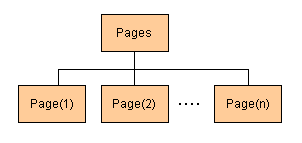
Additionally, the state that there are a lot of "Page" object under one "Pages" object is not good, because it causes performance degradation of a viewer application.
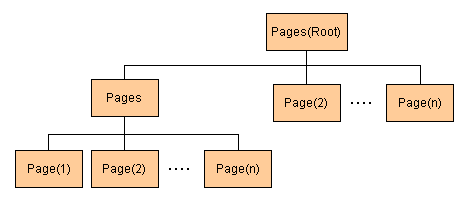
An application can change the setting of a pages tree by invoking
pages_configuration= . If page_per_pages parameter is set to more than
zero, a two-tier pages tree is created. A root "Pages" object can own
8191 "Pages" object, and each lower "Pages" object can own
page_per_pages "Page" objects. As a result, the maximum number of pages
becomes 8191 * page_per_pages page.
An application cannot invoke pages_configuration= after a page is added
to document.
Sets the PDF/A conformance level and generates the required XMP metadata block. Must be called before adding pages.
- level the conformance level (see
PDFAConformance).
sets the pasword for the document. If the password is set, contents in the document are encrypted.
- owner_password the password for the owner of the document.
The owner can change the permission of the document.
nil, zero length string and the same value as user password are not allowed. - user_password the password for the user of the document.
The user_password is allowed to be set to
nilor zero length string. - permission the flags specifying which operations are permitted. This parameter is set by logical addition of the following values.
writes the document to an in memory IO object. This will require memory for the size of the document.
enables simplified Chinese encodings. After use_cns_encodings
is involed, an application can use the following simplified
Chinese encodings.
enables Japanese fonts. After use_cns_fonts is called, an application
can use the following simplified Chinese fonts: ChineseSimplifiedFonts::All
enables traditional Chinese encodings. After use_cnt_encodings
is involed, an application can use the following traditional
Chinese encodings.
enables Japanese fonts. After use_jp_fonts is called, an application
can use the following traditional Chinese fonts: ChineseTraditionalFonts::All
enables Japanese encodings. After use_jp_encodings is involed,
an application can use the following Japanese encodings.
enables Japanese fonts. After use_jp_fonts is called, an application
can use the following Japanese fonts: JapaneseFonts::All
enables Korean encodings. After use_kr_encodings
is involed, an application can use the following Korean encodings.
enables Japanese fonts. After use_kr_fonts is called, an application
can use the following Korean fonts: KoreanFonts::All
enables UTF-8 encoding support. After use_utf_encodings is invoked,
the document can use UTF-8 encoded text with compatible encoders.
sets the viewer preferences that control PDF viewer UI behaviour on open.
- preference one or more
ViewerPreferenceflags combined with|.