github.com/ozgurulukir/fff.cr
0.3.2 / published Aug 1, 2026 / repository
Fucking Fast File Manager - Crystal port
fff.cr — Fucking Fast File Manager


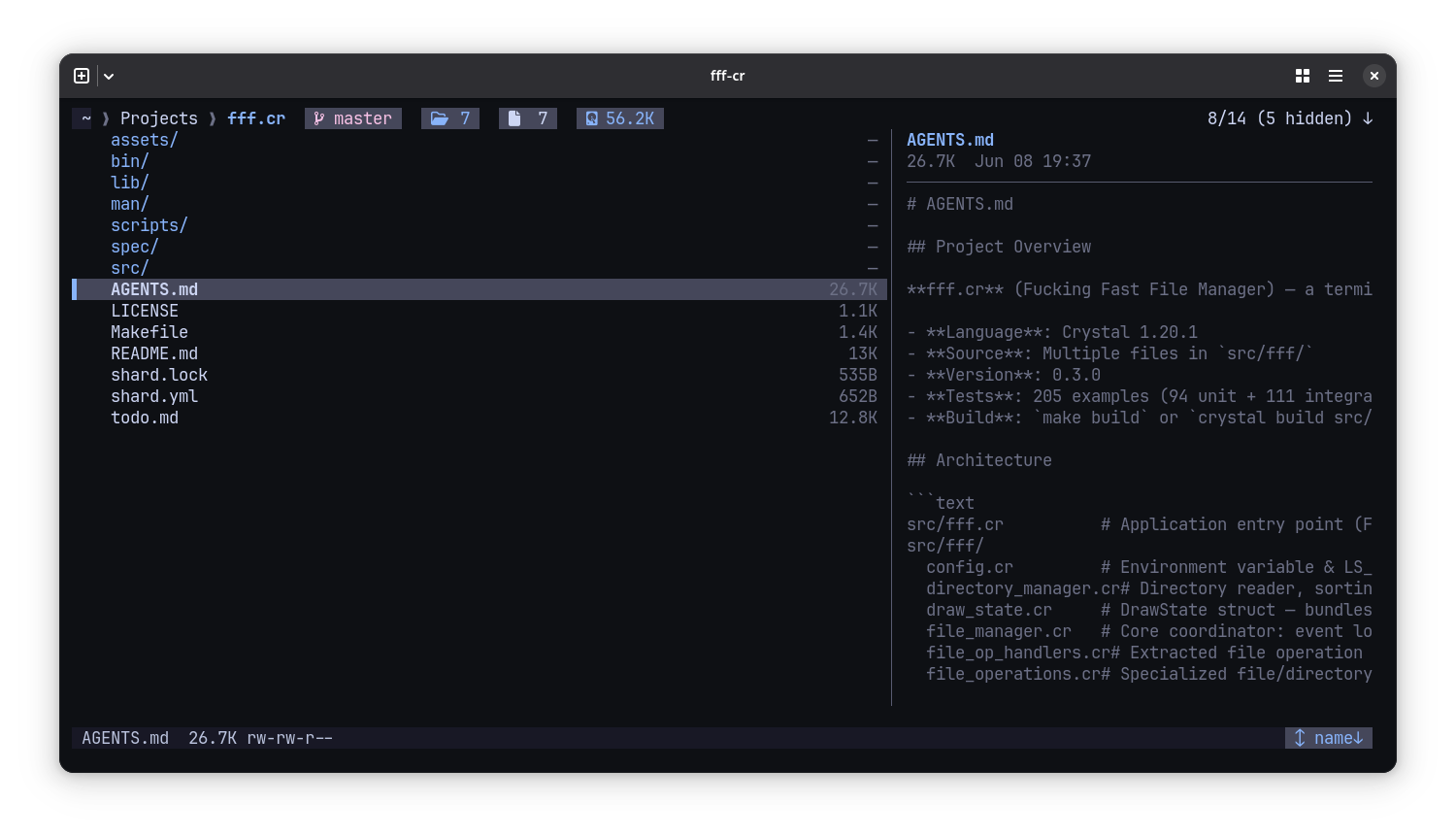
A terminal-based file manager written in Crystal. Ported from the original Bash version for performance, safety, and maintainability.
Features
- Fast:
LS_COLORScaching, optimized incremental render loop, no flicker - Modern Themes: Truecolor RGB central theme system with 5 built-in presets (
default,catppuccin-mocha,gruvbox-dark,nord,dracula). - Selection Indicator: Sleek vertical block (
▌) selection marker keeping native file type colors bolded on selection background. - Pill-Shaped Badges: Status and top bar indicators (clipboard, marks, sorting, git, file/folder counts, and directory size) rendered in colored pill badges.
- Nerd Font Icons: Support for file and directory icons using Nerd Fonts (over 100+ extensions and 35+ special file mapping).
- Dual-Pane View (Preview Panel): Interactive directory and file content preview side panel (automatically adapts when terminal columns >= 80).
- Details Columns: Shows file size and modification time directly in the file list, including on the selected line.
- Empty Directory State: Centered placeholder display for empty folders.
- Toast Notifications: Interactive notification system (Error, Success, Warning, Info) with custom colors and icons, featuring auto-expiry.
- Navigable Search: Fuzzy filename filtering, ripgrep content search (
!prefix), and recursive directory tree search (>prefix) while keeping cursor navigation live. - Progress Bars: Interactive progress bar for bulk operations (copying/deleting 5+ files).
- Inline Prompts & Confirms: Inputs (new file, new dir, rename, go-to-dir) and confirmations (delete, executable toggle) stay inside the TUI.
- File Operations: Copy, move, delete (trash), rename, bulk rename, symlink with auto-advance navigation.
- Smart Full Preview: Full-screen preview via
bat→less→ built-in fallback chain; file attributes viaFile::Info/stat - Picker Mode:
-pflag writes selection to~/.cache/fff/opened_filefor external tool integration - Secure: All external commands via
Process.run(no shell injection), pre-operation writability checks - Customizable: Full keybinding, theme, and layout control via environment variables or
~/.config/fff/config.json
Installation
Requirements
- Crystal 1.20.1+
- Windows 11, Linux, or macOS terminal (with true-color support recommended)
System dependencies
| Platform | Package | Notes |
|---|---|---|
| Debian/Ubuntu | libreadline-dev | Crystal links against readline on Linux |
| Fedora/RHEL | readline-devel | Same as above |
| Arch | readline | Included in base |
| macOS | (built-in) | Comes with Xcode Command Line Tools |
| Windows 11 | (none) | Crystal uses Win32 console API |
make depsinstalls Crystal shards and auto-patches knowncrystal-termbugs.
Build
On Linux/macOS:
make deps       # install shards
make build      # release build → bin/fff-cr
make debug      # debug build (faster compile)
make run        # build + run
make test       # run test suite

# Optional: system-wide install (including man page)
sudo make install
On Windows 11 (PowerShell):
shards install                              # install shards
crystal run scripts/patch_shards.cr         # patch known shard bug (ESC hang)
crystal build src/fff.cr -o bin/fff-cr.exe  # build fff-cr.exe
crystal spec spec/fff/                      # run unit tests
.\bin\fff-cr.exe                            # run the app
Usage
fff-cr                    # open current directory
fff-cr /path/to/dir       # open specific directory
fff-cr -p                 # picker mode (writes to opened_file cache)
Key Bindings
| Key | Action | Key | Action |
|---|---|---|---|
j/k | Down/Up | l/h | Enter/Parent |
q | Quit | ? | Help overlay |
/ | Search (Navigable) | space | Mark |
m | Mark all | y/v | Copy/Cut |
p | Paste | d | Delete (trash) |
t | Go to trash | n | New dir |
f | New file | r | Rename |
b | Bulk rename | i | Preview |
x | Attributes | X | Toggle executable |
s | Spawn shell | g/G | Top/Bottom |
↑/↓ | Cursor | PgUp/PgDn | Page up/down |
. | Toggle hidden | ~ | Home |
- | Previous dir | e | Refresh |
= / + | Cycle sort / Reverse | : | Go to dir |
S | Symlink | 1-9 | Favorites |
In search and rename modes, ←/→ move within the input text, Backspace/Delete edit, Home/End jump to start/end. In normal mode, ESC clears active search filters and marks. In search mode, ESC cancels the search; if you navigated the results with arrow keys, it drops you directly onto the selected file, otherwise it reverts to your pre-search position.
All bindings are configurable via FFF_KEY_* environment variables.
Search Engine Prefixes
When in search mode (triggered by /), you can prefix your query to activate different search modes:
| Prefix | Mode | Description |
|---|---|---|
| (none) | Fuzzy Filename | Fuzzy matches filenames within the current directory. |
! | Content Search | Calls rg (ripgrep) to search file content (requires pressing Enter to search). |
> | Recursive Search | Recursively fuzzy searches files in the directory tree (up to 5 levels deep, capped at 200 results) (requires pressing Enter to search). |
Configuration
fff reads from environment variables first, then falls back to ~/.config/fff/config.json.
UI & Layout Settings
| Env Variable | Config JSON Key | Description / Values |
|---|---|---|
FFF_THEME | theme.name | UI Theme: default, catppuccin-mocha, gruvbox-dark, nord, dracula (Default: default) |
FFF_ICONS | icons | Enable Nerd Font icons: 1 or true (Default: disabled) |
FFF_COLUMNS | columns | Show details columns (size/date): 0 to hide (Default: enabled) |
FFF_COLUMN_MODE | column_mode | Column display mode: size, date, or both (Default: both) |
FFF_PREVIEW | preview | Enable directory/file preview side-panel when term is wide enough: 1 or true (Default: disabled) |
FFF_PREVIEW_WIDTH | preview_width | Preview panel width: "40%" (ratio), "30" (absolute columns), nil → default 40% capped at 50 |
Key variables
export FFF_OPENER="xdg-open"              # file opener
export FFF_FAV1="$HOME/Documents"         # favorite dirs 1-9
export FFF_CD_ON_EXIT="1"                 # save cwd on exit
export FFF_TRASH="$HOME/.local/share/fff/trash"

# Example UI settings:
export FFF_THEME="catppuccin-mocha"
export FFF_ICONS="1"
export FFF_PREVIEW="1"
export FFF_PREVIEW_WIDTH="40%"
Full list of FFF_KEY_* variables: UP, DOWN, ENTER, QUIT, SEARCH, PARENT, MARK, MARK_ALL, COPY, MOVE, PASTE, DELETE, NEW_DIR, MKFILE, RENAME, BULK_RENAME, PREVIEW, SHELL, HIDDEN, HOME, PREVIOUS, REFRESH, ATTRIBUTES, EXECUTABLE, GO_DIR, GO_TRASH, SYMLINK, TOP, BOTTOM, PAGE_UP, PAGE_DOWN.
{
  "editor": "vim",
  "opener": "xdg-open",
  "trash_dir": "/path/to/trash",
  "theme": { "name": "catppuccin-mocha" },
  "icons": true,
  "columns": true,
  "column_mode": "both",
  "preview": true,
  "preview_width": "40%",
  "favorites": { "1": "/home/user/Documents" },
  "keys": { "up": "k", "down": "j" },
  "bookmarks": { "proj": "/home/user/projects" }
}
Preview
Press i to preview a file. The preview chain tries:
bat --paging=always— syntax-highlighted, scrollableless— paged, searchable- Built-in — plain text with full scroll support
Directories always use the built-in preview.
Project Structure
.
├── bin/fff-cr               # compiled binary
├── man/fff-cr.1             # man page
├── src/
│   ├── fff.cr               # entry point
│   └── fff/
│       ├── config.cr
│       ├── directory_manager.cr
│       ├── draw_state.cr
│       ├── file_manager.cr
│       ├── file_op_handlers.cr
│       ├── file_operations.cr
│       ├── file_service.cr
│       ├── format_utils.cr
│       ├── icon_provider.cr
│       ├── input_mode.cr
│       ├── message_bus.cr
│       ├── navigation_handlers.cr
│       ├── preview_panel.cr
│       ├── progress_bar.cr
│       ├── search_engine.cr
│       ├── terminal.cr
│       ├── theme.cr
│       ├── ui_renderer.cr
│       └── view_handlers.cr
├── spec/                    # test suite
│   ├── spec_helper.cr
│   ├── fff/
│   └── integration/
├── Makefile
├── shard.yml
├── .ameba.yml               # linter config
└── LICENSE
Architecture
- FFF::Application — CLI argument parsing, terminal setup
- FFF::Config — env var & JSON config management,
LS_COLORSparsing, layout preferences - FFF::DirectoryManager — directory reading, sorting, hidden-file filtering
- FFF::DrawState — bundles all redraw parameters into one struct
- FFF::FileManager — event loop, hash-table key dispatch, and TUI router; includes
NavigationHandlers,FileOpHandlers,ViewHandlers - FFF::FileOperations — file/directory creation, deletion, copying with callback blocks for progress tracking
- FFF::FileService — low-level
copy/move/trash/symlinkwith writability checks - FFF::FormatUtils — shared helpers (
human_size, date formatting),FFF::HOMEconstant - FFF::IconProvider — maps file extensions and special names to Nerd Font icons
- FFF::InputMode — search/rename text input with cursor control, editing, and search mode matching
- FFF::MessageBus — thread-safe TUI toast notification queue (Error/Success/Warning/Info)
- FFF::PreviewPanel — split pane displaying file previews/details and directory entries
- FFF::ProgressBar — ANSI progress bar tracking bulk operations
- FFF::SearchEngine — fuzzy filename matching, ripgrep content search, and recursive tree search
- FFF::Terminal —
crystal-termshard wrapper - FFF::Theme — truecolor RGB color palette system with pre-configured styles
- FFF::UIRenderer — incremental, flicker-free drawing, truecolor CSS/TUI styling, layout composition
Development
make test       # run all specs
make format     # crystal tool format
make lint       # ameba static analysis
Running Tests
make test           # all specs (298 examples)
crystal spec spec/integration/navigation_integration_spec.cr
crystal spec spec/integration/file_operations_integration_spec.cr
crystal spec spec/integration/ui_integration_spec.cr
Test Architecture
-
246 unit tests across 16 spec files (config, directory_manager, draw_state, file_operations, file_op_handlers, file_service, format_utils, icon_provider, input_mode, message_bus, navigation_handlers, preview_panel, progress_bar, search_engine, theme, ui_renderer)
-
52 integration tests across 4 suites (navigation, file_operations, ui, advanced) — use
MockTerminalto simulate keyboard input and prompts without a real TTY -
Both specs run headless; no terminal or display required
Patches
The project patches one remaining crystal-term shard bug (the term-reader ESC hang) via scripts/patch_shards.cr after shards install. make deps applies it automatically on Linux/macOS; on Windows, run crystal run scripts/patch_shards.cr manually. The script is idempotent. See AGENTS.md for details.
License
MIT. See LICENSE.